Trusty remote access software for your computers and devices, from anywhere.
You decide who connects, to which computer, and at what hours. Every connection is on record.
11:48 PM9:14 AM
Daniel's laptop
Working hoursMon to Fri, 9:00 AM to 5:00 PM
ACCOUNTS-2
The record
Daniel Weber connected to ACCOUNTS-2Today, 9:14 AM
Daniel Weber refused on ACCOUNTS-2, outside working hoursYesterday, 11:48 PM
How it works
- Install it on your computers. They show up in your account right away.
- Add your team. Pick which computers each person can reach, and when.
- Click to connect. No passwords to type. Every connection is logged.
Easy for beginners, powerful for advanced users.
A clear, friendly interface that anyone can set up in minutes, with advanced controls for those who need them.
Nothing connects without your permission.
Turn off access to every device at once with one master switch, or to each device or user on its own in one click. When someone leaves, turn off their login. They're logged out everywhere, and any open connection is cut off.

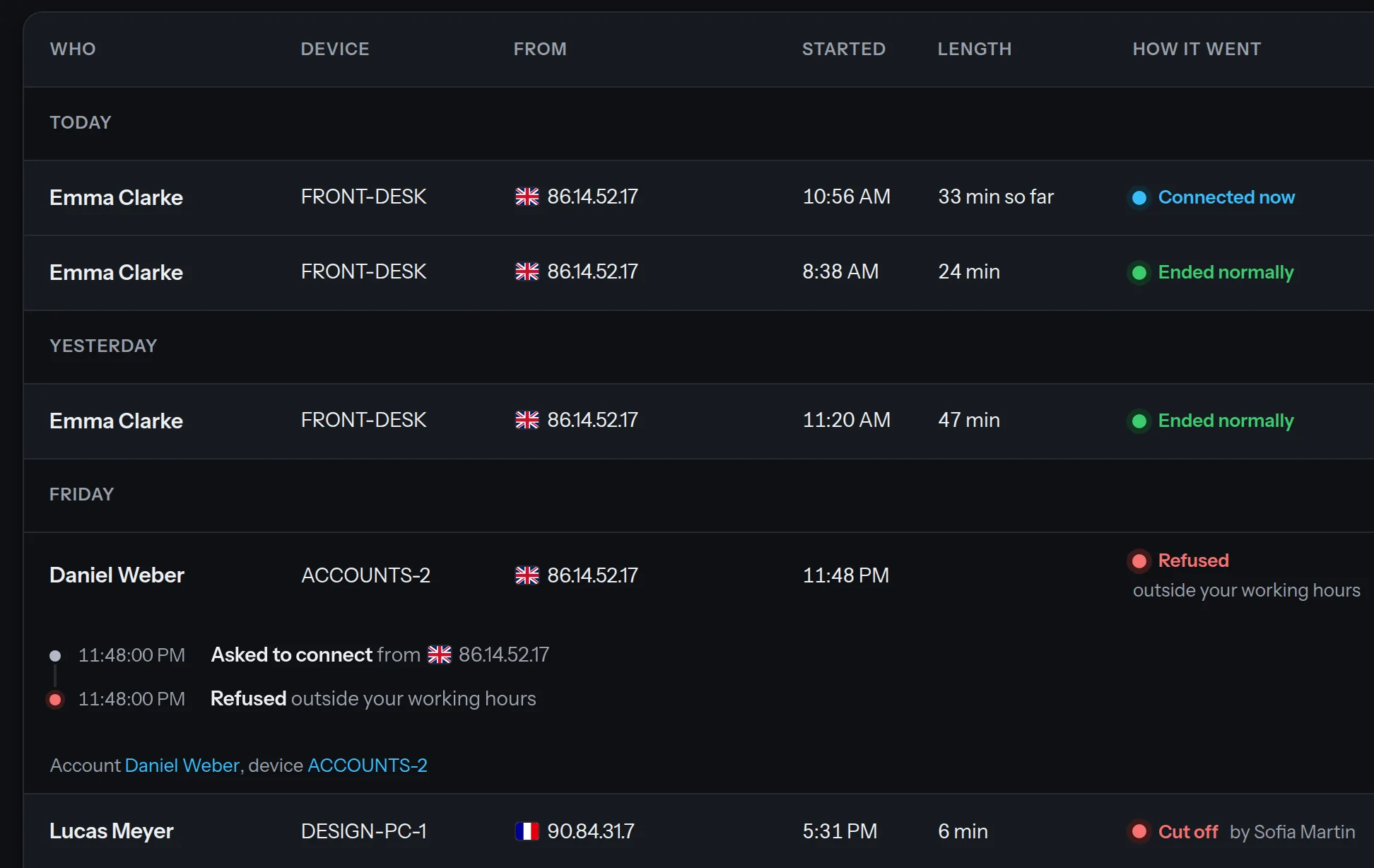
See everything that happens.
See who's connected right now, and every past connection. Open any connection for the full details: who connected, to which computer, from where, when, for how long, and what happened, step by step. No one can change the record, not even us.
Give each person their own access.
Choose which devices each person can connect to, what they're allowed to do, and at what hours.

Nothing happens without you knowing.
Get instant notifications by email or on your phone for new connections, file transfers and logins from a new country.

-
Only your account can reach your devices.
No other TrustyAccess account can see your devices or connect to them, ever. It's always on, with nothing to set up.
-
Works on your computers and servers.
Connect to and from Windows and Linux. Usually there's nothing to change on your router or firewall.
-
Every file transfer on record.
Every file sent to or from a computer during a connection is logged: what it was, who moved it, and when.
-
Your name on every connection.
Show your logo and company name on every computer you connect to, so people always know who's connected. You can also make them accept each connection first.
-
Your passwords, locked with a key unique to your account.
Every device gets its own strong password, sealed with an encryption key generated just for your account. Not even we can see it. Your team connects in one click without ever seeing a password.
-
Encrypted connections and two factor login.
Every connection is encrypted. Two factor login (2FA) keeps others out of your account, even if your password leaks.
More devices and users, at a fraction of the price.
-
Starter
$20 a month
Up to 100 devices and 5 users
-
Business
$50 a month
Up to 300 devices and 15 users
-
Pro
$100 a month
Up to 500 devices and 50 users
Every plan starts with a 30-day free trial. See full pricing
Billed monthly or yearly. Renews automatically until you cancel.
FAQ
Who can see the connection history?
Your account's managers. They see who's connected right now and every past connection, with full details. You choose how long the history is kept.
What happens after the 30-day free trial?
No card is needed for the trial. When it ends, choose a plan to keep going.
Can I cancel anytime?
Yes. Cancel anytime, keep access until the end of your billing period, and you won't be charged again.
What if I need more devices or users?
Move to a bigger plan anytime. Business covers up to 300 devices and 15 users, and Pro up to 500 devices and 50 users.